
BetPKR Register And Login Guide
Your BetPKR account uses a single username and password to give you access to your games, wallet, and rewards. We created a new account, tested the login process through both the app and a browser, and deliberately tried common login mistakes to see how the system responded. This guide covers the login requirements, step-by-step instructions, and practical fixes for common errors, helping you access your BetPKR account without unnecessary delays.
The Two Rules Behind Every BetPKR Register
The form asks for very little, which is why it’s quick. There’s no phone number, no email and no ID card field. You fill in three boxes: username, password and Confirm Password. Two rules decide whether the BetPKR Register goes through:
- Username: 6 to 13 characters, English letters and numbers only.
- Password: 6 to 12 characters, English letters and numbers only.
Anything else, such as a space, an underscore, a dot, an @ or a # sign, brings up a red warning under the field. Each person should keep one BetPKR account, and you must be 18 or older.
Username Ideas That Pass
Here’s what you’ll actually want: something you’ll remember for years, because this name is how you sign in and how support finds you. These examples all fit the rules:
| Username | Length | Why It Works |
| shahzad1990 | 11 | Name plus a year, easy to remember |
| multanfan22 | 11 | City and a number, no symbols |
| bilalpk786 | 10 | Short, letters and numbers only |
| quetta2026 | 10 | Simple city idea |
| cricketlover7 | 13 | Right at the upper limit |
| hamza99 | 7 | Short but still above six |
| noorpindi | 9 | Letters alone are fine too |
Tip: if the form says a name is taken, add two digits rather than a symbol. “multanfan22” becoming “multanfan2245” still fits at 13 characters.
Usernames That Fail and Why
These are the common Name Problems when Getting Register On BetPkr Game and their Quick Fixes:
| Username Tried | Problem | Quick Fix |
| ali7 | Only 4 characters | ali7lahore |
| usman_khan | Underscore isn’t allowed | usmankhan |
| usman khan | Space isn’t allowed | usmankhan1 |
| pindiboy@92 | The @ sign is a symbol | pindiboy92 |
| karachikings2026 | 16 characters, too long | karachiking26 |
| zaid.123 | Dot isn’t allowed | zaid1234 |
| A name typed in Urdu script | Only English letters are accepted | Write it in Roman letters |
Rules Tester: Check Yours Before You Type
Count your characters on your fingers or in a notes app, then compare against this table. The password examples show that passing the rules isn’t the same as being safe.
| Test | Example | Result | Note |
| Username, 6 to 13 characters | kashif2026 | Pass | 10 characters |
| Username with a symbol | kashif#2026 | Fail | Remove the # |
| Password under 6 characters | pak12 | Fail | Only 5 characters |
| Password over 12 characters | mypassword2026x | Fail | 15 characters |
| Password with a space | chai 4 me | Fail | Spaces aren’t accepted |
| Password with a # sign | Sialkot#2026 | Fail | Symbols aren’t accepted |
| All-number password | 123456 | Pass, but risky | Easy for anyone to guess |
| Mixed password | Gm7kQ2ra9 | Pass, strong | Letters and numbers mixed |
Usernames and passwords may be case-sensitive, so treat “Hamza99” and “hamza99” as different and type them the same way every time.
BetPKR Register Walkthrough
You’ll need about a minute. If the app isn’t on your phone yet, our BetPKR App Download guide covers the install for each phone brand.
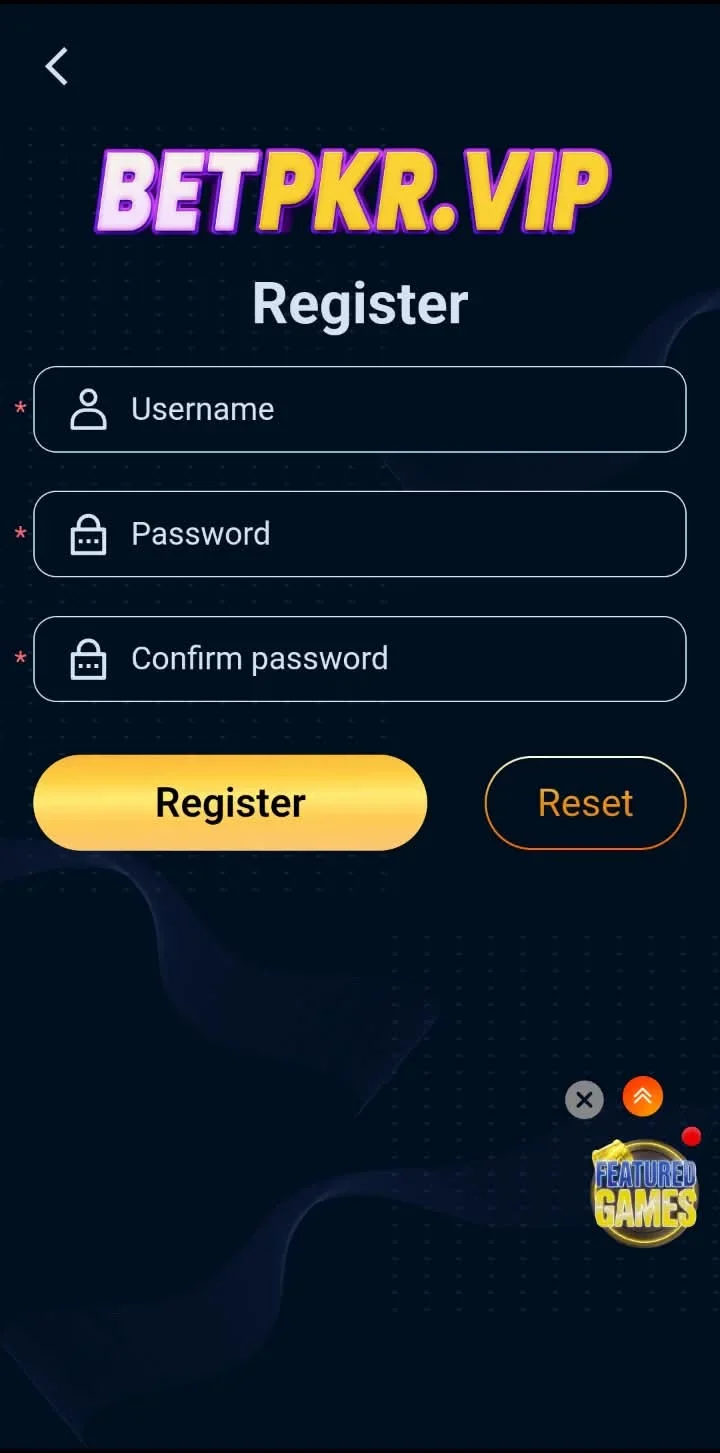
Open the Register Form
Open the BETPKR app or the official website. Tap Register under the sign-in boxes.
Type a Username From Your Shortlist
Use a name that already passed the tester above. If it’s taken, the form tells you, and you can add digits.
Set Your Password
Type 6 to 12 letters and numbers. A mix like the strong example in the table is the safer choice.
Repeat It in Confirm Password
Type the same password again. A single different letter here is the most common reason the BetPKR register button seems to do nothing.
Tap Register
The BetPKR register request goes through instantly and the app signs you straight in. The new member registration reward lands in your reward centre automatically, usually within 12 hours.
Your First BetPKR Login
After the BetPKR Sign Up you’re already signed in, but you’ll use the sign-in form from your next visit onward. Here’s the routine:
- Open the app and type your username exactly as you created it.
- Type your password. Tap the eye icon if you want to check it.
- Tick Remember only if the phone is yours alone.
- Tap Login.
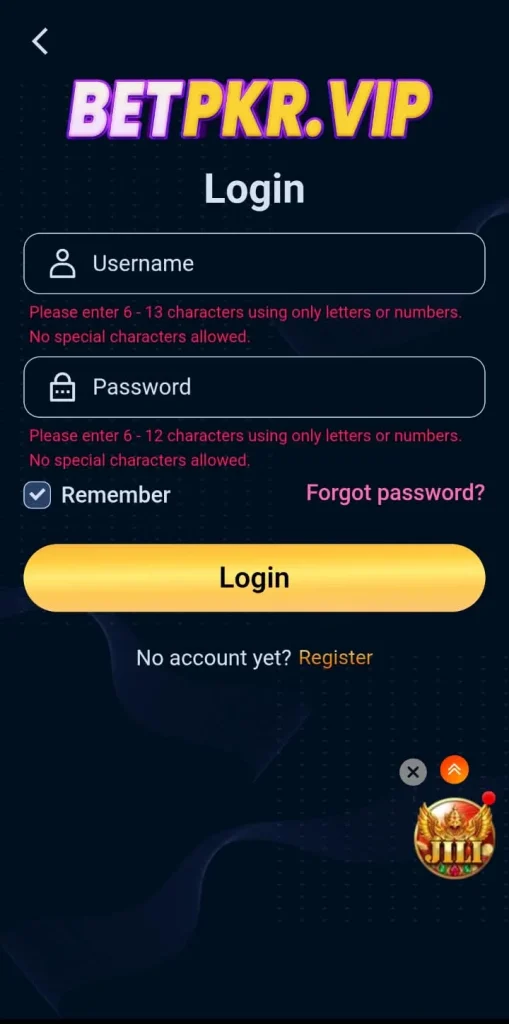
If BetPKR keeps asking you to enter your login details, tick the Remember option and make sure your phone’s battery-saver settings do not clear the app’s data.On a family phone, skip Remember and sign out after each session.
A Quick Tour of Your Account Settings
Your first BetPKR Login opens with two pop-ups, one for daily member benefits and one for the invite program. Close them with the X, then take a look around:
- Shows your loyalty level, which starts at VIP0, with a progress bar toward the next level. This is also where you’ll find settings, your history and the log-out option at the bottom.
- Tap the red + to link a JazzCash, Easypaisa or bank account. You can link up to three bank accounts. Use an account in your own name, since a mismatched title slows payouts. Our payments guide goes deeper.
- Lists your reward vouchers, each with a countdown. One welcome voucher on our test account stayed locked until we linked a withdrawal account.
- Hold your personal invite link and QR code. The BetPKR Agent page explains how the invite program pays.
- Has the daily sign-in calendar.
- Lists every active offer with its rules card. See our BetPKR Promotions page for a plain-English breakdown.
One thing we couldn’t find anywhere in the menus was an option to change your username. Choose carefully during the BetPKR Sign Up, because you’ll likely keep that name.
One Account, Several Devices
Your Bet PKR account isn’t tied to one phone. The same username and password work everywhere, and your balance follows you.
| Device | How You Get In | Good Habit |
| Your own Android phone | BETPKR app with Remember ticked | Keep the app updated |
| A second Android phone | Install the app and sign in | Sign out if you stop using it |
| iPhone | Official site in Safari | Add a home screen shortcut |
| Laptop or office computer | Official site in Chrome or Edge | Never tick Remember, always sign out |
The app finds a working connection by itself, while a browser may need a different official address if one stops opening. Before you sell or hand over an old phone, sign out from the Member tab and uninstall the app.
Getting Back In: Account Recovery
Locked out? Don’t open a second BetPKR account, because your balance stays with the original username. Recovery has three steps:
- On the BetPKR Game Login screen, tap Forgot password?
- Follow the on-screen steps.
- If that doesn’t get you in, open Live Chat and give them your username.
If you see a lock message after several wrong tries, wait a while before trying again rather than guessing over and over. And never type your old or new password into a chat window. Real support staff won’t ask for it.
Security Checklist
- Create a password that combines letters and numbers, and use a password that you do not use for Facebook, email, or any other account.
- Your username is written down somewhere private.
- Remember is ticked only on your own phone.
- You sign out on every shared or office device.
- Only sign in through the official app or site, never a link from a group.
- You haven’t bought, sold or shared your BetPKR account.
- Your linked payout account is in your own name.
For general password advice, the CISA guide to strong passwords is short and worth a read.
Frequently Asked Questions?
Conclusion
The BetPKR Sign Up is one of the quickest we’ve tested, and the short form is a real plus. The honest downside is that with no phone number or email attached, your username is your only lifeline, so losing it makes recovery harder. Write it down, use a strong mixed password, keep Remember for your own phone only, and you’ll rarely have a BetPKR Login problem. When you’re in, the BetPKR games guide shows where to start, or visit our BetPKR Pakistan home page.